Large payload storage - Python SDK
The Temporal Service enforces a ~2 MB per payload limit. When your Workflows or Activities handle data larger than the limit, you can offload payloads to external storage, such as S3, and pass a small reference token through the Event History instead. This is called the claim check pattern.
External Storage sits at the end of the data pipeline, after both the Payload Converter and the Payload Codec:
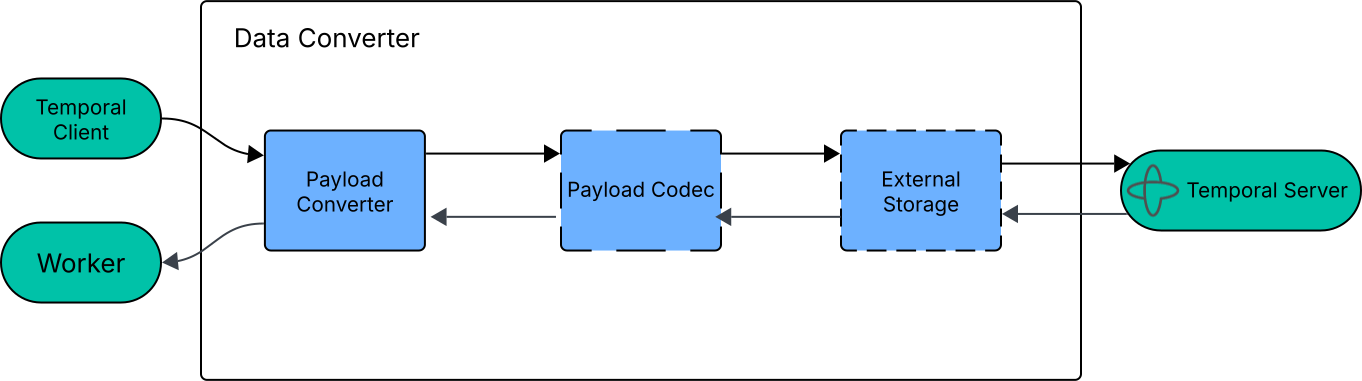
The Flow of Data through a Data Converter
When a payload exceeds a configurable size threshold, the storage driver uploads it to your external store and replaces it with a lightweight reference. Payloads below the threshold stay inline in the Event History. On the way back, reference payloads are retrieved from external storage before the Payload Codec decodes them.
Because External Storage runs after the Payload Codec, if you use an encryption codec, payloads are already encrypted before they're uploaded to your store.
Store and retrieve large payloads with S3
The Python SDK includes a contrib S3 storage driver. Follow these steps to set it up:
-
Install the S3 driver dependency:
pip install temporalio[s3driver] -
Create an
S3StorageDriverClientand anS3StorageDriver:from temporalio.contrib.aws.s3driver import S3StorageDriver, S3StorageDriverClient
driver_client = S3StorageDriverClient()
driver = S3StorageDriver(client=driver_client, bucket="my-temporal-payloads")The driver generates S3 keys using a SHA-256 hash of the payload content. Identical payloads produce the same key, so the driver skips the upload if the object already exists. The driver includes the namespace and Workflow ID in the S3 key to group related payloads in your bucket. For example:
v0/ns/my-namespace/wfi/my-workflow/d/sha256/{hash}.To reject payloads above a hard limit before uploading, set
max_payload_size:driver = S3StorageDriver(
client=driver_client,
bucket="my-temporal-payloads",
max_payload_size=50 * 1024 * 1024, # 50 MiB
) -
Configure the driver on your
DataConverterand pass the converter to your Client and Worker:from temporalio.converter import DataConverter, ExternalStorage
converter = DataConverter(
external_storage=ExternalStorage(
drivers=[driver],
payload_size_threshold=256 * 1024, # 256 KiB (default)
),
)
client = await Client.connect("localhost:7233", data_converter=converter)
worker = Worker(
client,
task_queue="my-task-queue",
workflows=[MyWorkflow],
activities=[my_activity],
)
All Workflows and Activities running on the Worker use the storage driver automatically without changes to your business logic. The driver uploads and downloads payloads concurrently and validates payload integrity on retrieve.
-
(Optional) To route payloads to different buckets, pass a function as the
bucketparameter instead of a string. The function takes the store context and the payload as arguments, and returns a bucket name, so you can route based on the Activity Task Queue or other context:from temporalio.converter import StorageDriverStoreContext, ActivitySerializationContext
from temporalio.api.common.v1 import Payload
QUEUE_BUCKETS = {
"queue-a": "bucket-queue-a",
"queue-b": "bucket-queue-b",
}
def bucket_selector(ctx: StorageDriverStoreContext, payload: Payload) -> str:
if isinstance(ctx.serialization_context, ActivitySerializationContext):
queue = ctx.serialization_context.activity_task_queue
if queue and queue in QUEUE_BUCKETS:
return QUEUE_BUCKETS[queue]
return "default-bucket"
driver = S3StorageDriver(client=driver_client, bucket=bucket_selector)
Implement a custom storage driver
If you need a storage system other than S3, you can implement your own storage driver. The following example shows a complete custom driver implementation that uses local disk as the backing store:
import os
import uuid
from typing import Sequence

from temporalio.api.common.v1 import Payload
from temporalio.converter import (
    StorageDriver,
    StorageDriverClaim,
    StorageDriverStoreContext,
    StorageDriverRetrieveContext,
)


class LocalDiskStorageDriver(StorageDriver):
    def __init__(self, store_dir: str = "/tmp/temporal-payload-store") -> None:
        self._store_dir = store_dir

    def name(self) -> str:
        return "local-disk"

    async def store(
        self,
        context: StorageDriverStoreContext,
        payloads: Sequence[Payload],
    ) -> list[StorageDriverClaim]:
        os.makedirs(self._store_dir, exist_ok=True)

        prefix = self._store_dir
        sc = context.serialization_context
        if sc is not None and hasattr(sc, "workflow_id"):
            prefix = os.path.join(self._store_dir, sc.namespace, sc.workflow_id)
            os.makedirs(prefix, exist_ok=True)

        claims = []
        for payload in payloads:
            key = f"{uuid.uuid4()}.bin"
            file_path = os.path.join(prefix, key)
            with open(file_path, "wb") as f:
                f.write(payload.SerializeToString())
            claims.append(StorageDriverClaim(claim_data={"path": file_path}))
        return claims

    async def retrieve(
        self,
        context: StorageDriverRetrieveContext,
        claims: Sequence[StorageDriverClaim],
    ) -> list[Payload]:
        payloads = []
        for claim in claims:
            file_path = claim.claim_data["path"]
            with open(file_path, "rb") as f:
                data = f.read()
            payload = Payload()
            payload.ParseFromString(data)
            payloads.append(payload)
        return payloads
Extend the StorageDriver class
A custom driver extends the StorageDriver abstract class and implements three methods:
name()returns a unique string that identifies the driver.store()receives a list of payloads and returns oneStorageDriverClaimper payload. A claim is a set of string key-value pairs that the driver uses to locate the payload later.retrieve()receives the claims thatstore()produced and returns the original payloads.
Store payloads
In store(), serialize each payload to bytes with payload.SerializeToString(), upload the bytes to your storage
system, and return a StorageDriverClaim with enough information to find the payload later. Using a content-addressable
key like a SHA-256 hash gives you deduplication for free.
Retrieve payloads
In retrieve(), download the bytes using the claim data, then reconstruct the payload with
payload.ParseFromString(data).
Configure the Data Converter
Pass an ExternalStorage instance to your DataConverter and use the converter when creating your Client and Worker:
from temporalio.converter import DataConverter, ExternalStorage

converter = DataConverter(
    external_storage=ExternalStorage(
        drivers=[MyStorageDriver()],
        payload_size_threshold=256 * 1024,  # 256 KiB (default)
    ),
)
Adjust the size threshold
The payload_size_threshold controls which payloads get offloaded. Payloads smaller than this value stay inline in the
Event History.
ExternalStorage(
    drivers=[driver],
    payload_size_threshold=100 * 1024,  # 100 KiB
)
Set it to None to externalize all payloads regardless of size.
Use multiple storage drivers
When you have multiple drivers, for example hot and cold storage tiers, pass a driver_selector function that chooses
which driver handles each payload:
hot_driver = MyStorageDriver("hot-bucket")
cold_driver = MyStorageDriver("cold-bucket")

ExternalStorage(
    drivers=[hot_driver, cold_driver],
    driver_selector=lambda context, payload: (
        cold_driver if payload.ByteSize() > 1_000_000 else hot_driver
    ),
    payload_size_threshold=100 * 1024,
)
Return None from the selector to keep a specific payload inline.